.

.
Showing posts with label MySql. Show all posts

Unknown collation: 'utf8mb4_unicode_ci' Cpanel

I have a wordpress database on my local machine that I want to transfer to a hosted phpMyAdmin on Cpanel. However when I try to import the database into the environment, I keep getting this error.

#1273 - Unknown collation: 'utf8mb4_unicode_ci' 

Solution : This can be solved by running a PHP script. Save this code to a file and run it entering the database name, user and password and it'll change the collation from utf8mb4/utf8mb4_unicode_ci to utf8/utf8_general_ci
<!DOCTYPE html>
<html>
<head>
  <title>DB-Convert</title>
  <style>
    body { font-family:"Courier New", Courier, monospace;" }
  </style>
</head>
<body>
<h1>Convert your Database to utf8_general_ci!</h1>
<form action="db-convert.php" method="post">
  dbname: <input type="text" name="dbname"><br>
  dbuser: <input type="text" name="dbuser"><br>
  dbpass: <input type="text" name="dbpassword"><br>
  <input type="submit">
</form>
</body>
</html>
<?php
if ($_POST) {
  $dbname = $_POST['dbname'];
  $dbuser = $_POST['dbuser'];
  $dbpassword = $_POST['dbpassword'];
  $con = mysql_connect('localhost',$dbuser,$dbpassword);
  if(!$con) { echo "Cannot connect to the database ";die();}
  mysql_select_db($dbname);
  $result=mysql_query('show tables');
  while($tables = mysql_fetch_array($result)) {
          foreach ($tables as $key => $value) {
           mysql_query("ALTER TABLE $value CONVERT TO CHARACTER SET utf8 COLLATE utf8_general_ci");
     }}
  echo "<script>alert('The collation of your database has been successfully changed!');</script>";
}

?>


How To Convert MSAccess Database in to Mysql Database

Step 1.  Download Software From 


Download Access To MySQL Product From 


After Install this software follow this steps .

1) In the first step you are asked to supply the file name of the Microsoft Access Database to convert.
If your Access database requires you to log in you can specify a user name, password and a system database.

2)The destination database and MySQL server connection settings are specified as shown below. You will have the choice of placing the result in a dump file instead of transferring it directly to another MySQL database.

3)You can specify exactly which tables you want to transfer to the destination database. Just check the box in front of each table name you want to transfer and click next.

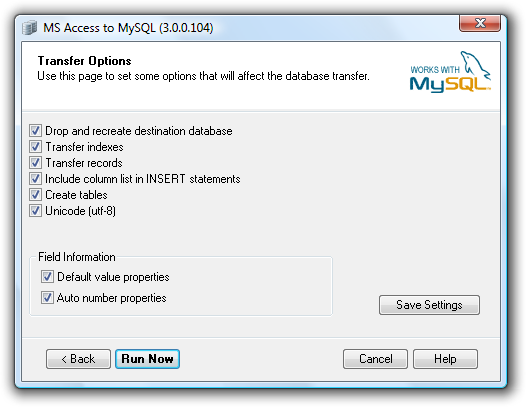
4)A You can also select not to transfer any records. This will only create the tables in the destination table and leave them empty.
In both Access and MySQL fields can have default values. When creating the tables in MySQL the program can preserve the default values specified in the Access field definition. Also auto number properties of a field can be transferred if you check the Auto number properties box.

The transfer will now run until all the selected tables are transferred. When the transfer is done you will see a small report telling you how much data was transferred.


How To Combine Two or more column in mysql Database

To concat or combine two or more column in mysql database.  
 I have the following structure with a MySQL table:
+----------------+----------------+----------+
|    zipcode     |      city      |   state         |
+----------------+----------------+----------+
|     10954      |     Nanuet     |    NY    |
+----------------+----------------+----------+
I want to combine the above 3 columns into one column like this:
+---------------------+
|      combined       |
+---------------------+
| 10954 - Nanuet, NY  |
+---------------------+
And I want to add this "combined" column to the end of the table without destroying the original 3 fields.
How to combine two or more column in mysql database,combine two or more column in mysql database,two or more column in mysql database,more column in mysql database,column in mysql database,


Create the column:
alter table add column combined varchar(50);

Update the current values:
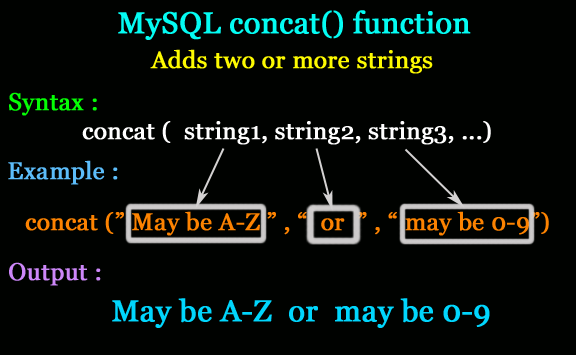
update tablename set combined = concat(zipcode, ' - ', city, ', ', state);

How to import large sql files into mysql using phpmyadmin wamp server

When you try to import sql file to wamp server usually it cann't upload more than  2,048KiB size and gives error message like


When you try to import sql file to wamp server usually it cann't upload more than  2,048KiB size and gives error message like


There is another way to upload large size of sql file to wamp server

step 1

Find the config.inc.php file located in the phpmyadmin directory. In my case it is located here: 

C:\wamp\apps\phpmyadmin3.4.5\config.inc.php 

Note:  phymyadmin3.4.5 folder name is different in different version of wamp

step 2:

Find the line with $cfg['UploadDir'] on it and update it to:

$cfg['UploadDir'] = 'upload';


step 3:
Create a directory called ‘upload’ within the phpmyadmin directory.
    
C:\wamp\apps\phpmyadmin3.2.0.1\upload\


step 4:

copy and paste the  large sql file into upload directory which you want importing to phymyadmin

step 5: 

select sql file from drop down list from phymyadmin to import